# How to schedule a meeting within Teams.

When you want to schedule a meeting within the Teams app.

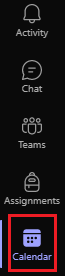
1\) In Teams, select **Calendar <span class="confluence-embedded-file-wrapper">![](https://support.content.office.net/en-us/media/f788fe72-7168-45df-98c8-58ceac0a9aac.png)</span>** view.

[![image.png](https://docs.northshorecollege.edu/uploads/images/gallery/2022-10/scaled-1680-/49LMINKspcxW19If-image.png)](https://docs.northshorecollege.edu/uploads/images/gallery/2022-10/49LMINKspcxW19If-image.png)

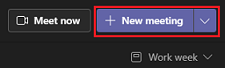
2\) In the top right corner, select **+New Meeting**

[![image.png](https://docs.northshorecollege.edu/uploads/images/gallery/2022-10/scaled-1680-/GYuHARZD5idq7hem-image.png)](https://docs.northshorecollege.edu/uploads/images/gallery/2022-10/GYuHARZD5idq7hem-image.png)
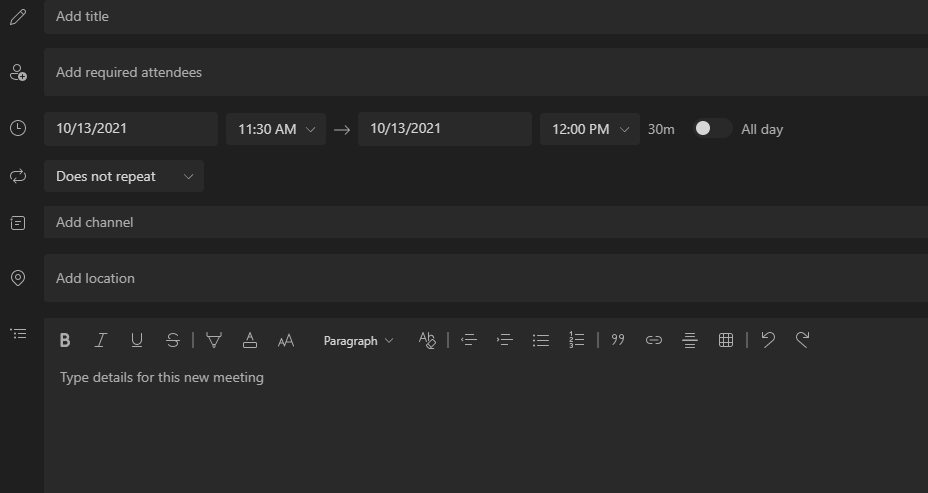
3\) Fill out all information that is needed such as attendees and date.

[![image.png](https://docs.northshorecollege.edu/uploads/images/gallery/2022-10/scaled-1680-/ZVb0oNxVXNEJOQx9-image.png)](https://docs.northshorecollege.edu/uploads/images/gallery/2022-10/ZVb0oNxVXNEJOQx9-image.png)
4\) Select **Save** in the top right corner.

[![image.png](https://docs.northshorecollege.edu/uploads/images/gallery/2022-10/scaled-1680-/UXGCLvI5QvorBfSn-image.png)](https://docs.northshorecollege.edu/uploads/images/gallery/2022-10/UXGCLvI5QvorBfSn-image.png)

<p class="callout info">You can also choose <span class="confluence-embedded-file-wrapper confluence-embedded-manual-size">![](https://kb.northshorecollege.edu:8443/download/thumbnails/71730749/image2021-10-13_11-24-50.png?version=1&modificationDate=1634142290699&api=v2)</span> if you want to start a meeting right away instead of scheduling it for later.</p>