Logging into Zoom Phone
Logging into Zoom Phone is relatively simple, but if you don't click a certain button, it won't work.
The Zoom Phone software is ONLY supported on NTCC-owned laptops. It is not supported on mobile devices or personally-owned computers.
Steps to login to the Zoom Phone desktop application
If you don't have the Zoom application installed, install it from the Software Center.
Open the Zoom application
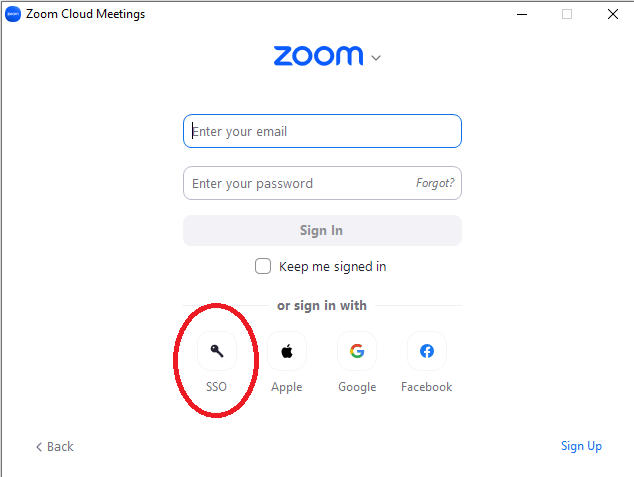
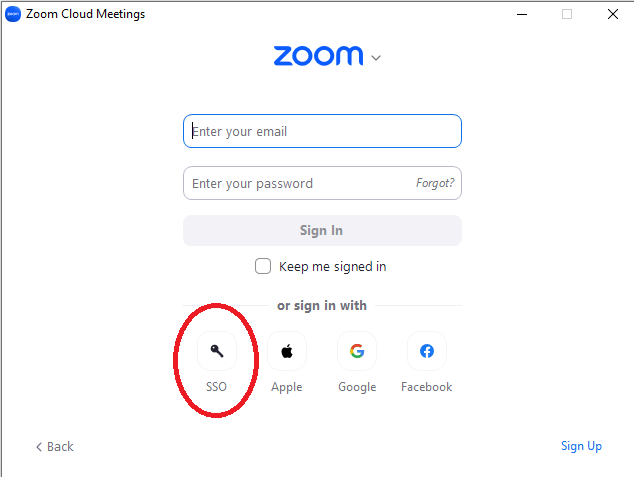
Press the SSO button
Enter northshorecollege in the text box. Entering anything else will cause it to not recognize the college's single sign-on.
You will be redirected to the normal NTCC single sign-onThis page
withwas Lacombe campus in the background. Login using your NTCC email username and password as you would for email.
Steps to login to the Zoom website
Open a web browser like Google Chrome
Navigatemoved to
https://northshorecollege.zoom.usthis Confluence knowledgebase article. ClickPlease theupdate signany in button
You will be redirected to the normal NTCC single sign-on page with Lacombe campus in the background. Login using your NTCC email username and password asbookmarks you
wouldmay for email.
have.
You can also follow this video here.